Dell ProMax, What Fits in 128GB?
| ⚠️ |
|---|
Disclosure: Dell gave me a Dell Pro Max with GB10. I did not pay for it. I am not paid to write about it. Nobody at Dell sees these posts before you do.
| ⚠️ |
|---|
In this blog post in the Local AI series, we are exploring what theoretically fits on the hardware. Actual usage experience may vary but where possible I will attempt to call any pertient details.
What Actually Fits in 128GB
The spec sheet says 128GB unified memory. That number looks great on paper, but what does it give you?
Hopefully by the end of this blog, you will have an idea of what is achievable from the hardware at hand.
I pointed llmfit at it, an open-source tool that checks a model catalogue against your actual hardware and tells you what will fit. It is a great tool and even has the capacity to recognise when/if these are in a clustered configuration. The tool itself knows of circa 9,361 models (at the time of writing), which is extensive but here you will only see:
- Alibaba
- Deepseek
- Meta
- Microsoft
- Mistral AI
- Open AI
What unified memory actually changes
Unified memory means the CPU and GPU share one pool rather than the GPU having its own dedicated allocation. On a conventional workstation, a 24GB card gives you 24GB for the model, full stop, and anything larger simply refuses to load.
Here, the model competes with the operating system and everything else for one much larger pool. The ceiling is far higher, and the cost is that you feel memory pressure as degraded throughput rather than as a hard failure.
Practically: you can load models on this box that will not load on a consumer GPU costing a significant fraction of the price, and you will pay for it in tokens per second. That trade is the entire story of this class of device.
How to read model sizes
Rough working rule for a quantised model:
Approximate memory = parameters (billions) × bytes-per-parameter + KV cache + overhead
At 4-bit quantisation, roughly 0.5–0.6GB per billion parameters. At 8-bit, roughly double. At full 16-bit precision, roughly four times.
The KV cache is the part people forget. It grows with context length and with the number of concurrent requests. A model that loads comfortably at 4k context can fall over at 128k with three users on it and that is a much more common failure in practice than simply picking a model that is too large.
If you are sizing this for a team rather than for yourself, size for the context window and the concurrency, not for the parameter count.
When is 128GB not 128GB?
Well this should’nt come as no surprise, previous posts mention about Unfied Memory and this is the affect of that. Once booted up we can seen 123GB of memory left for use. Note: I have some items configured running in the background so on a vanilla install you may see increased amounts of Unified Memory than documented here.
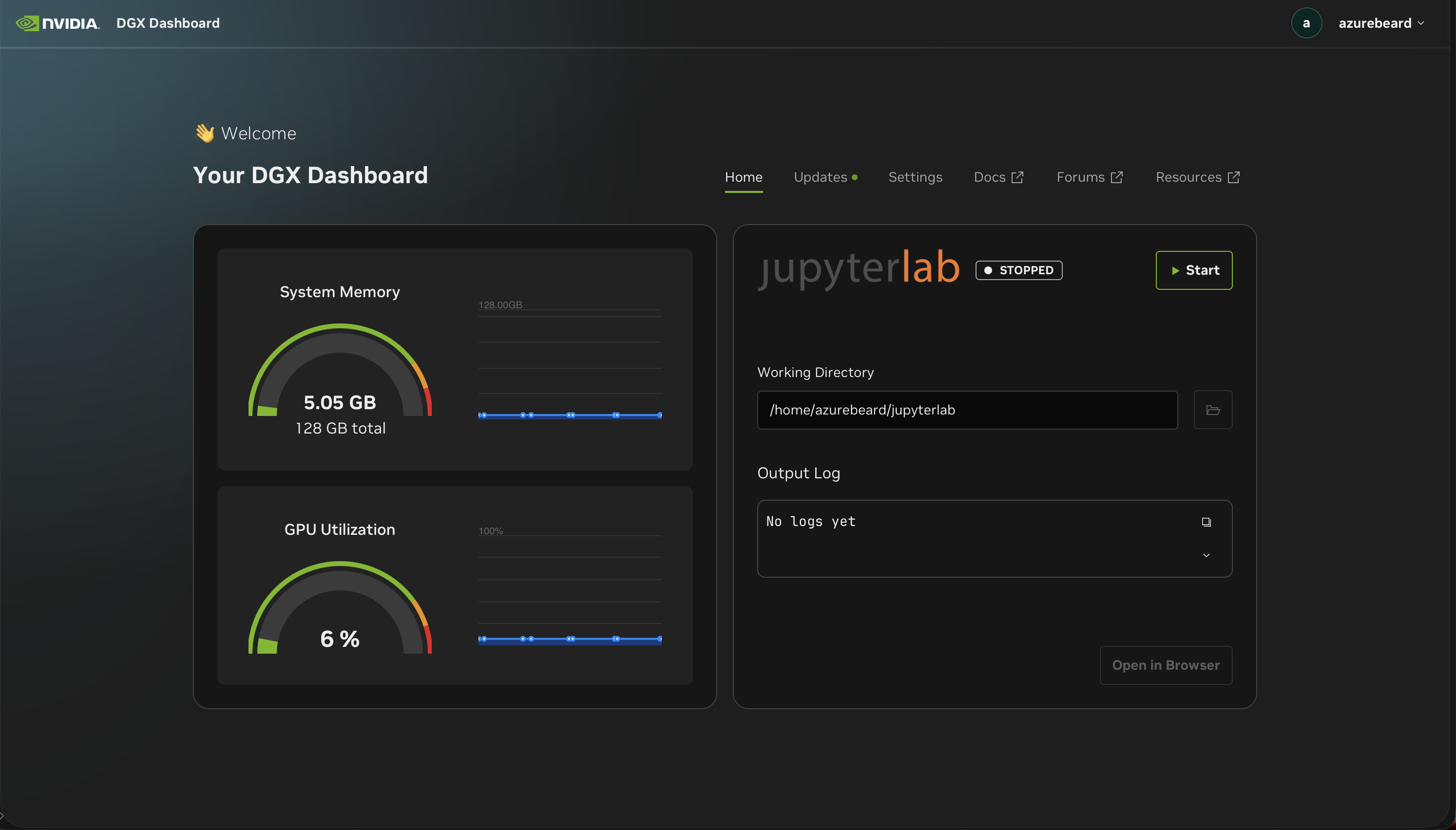
That’s not a scandal, the gap between marketed and usable capacity is normal across all computing, and unified memory means the OS is drawing from the same pool your model wants. But it matters when you’re sizing.
If you’re building a business case on “128GB”, ensure you factor in that you will not see all 128GB Unified Memory on a single box.
455 models
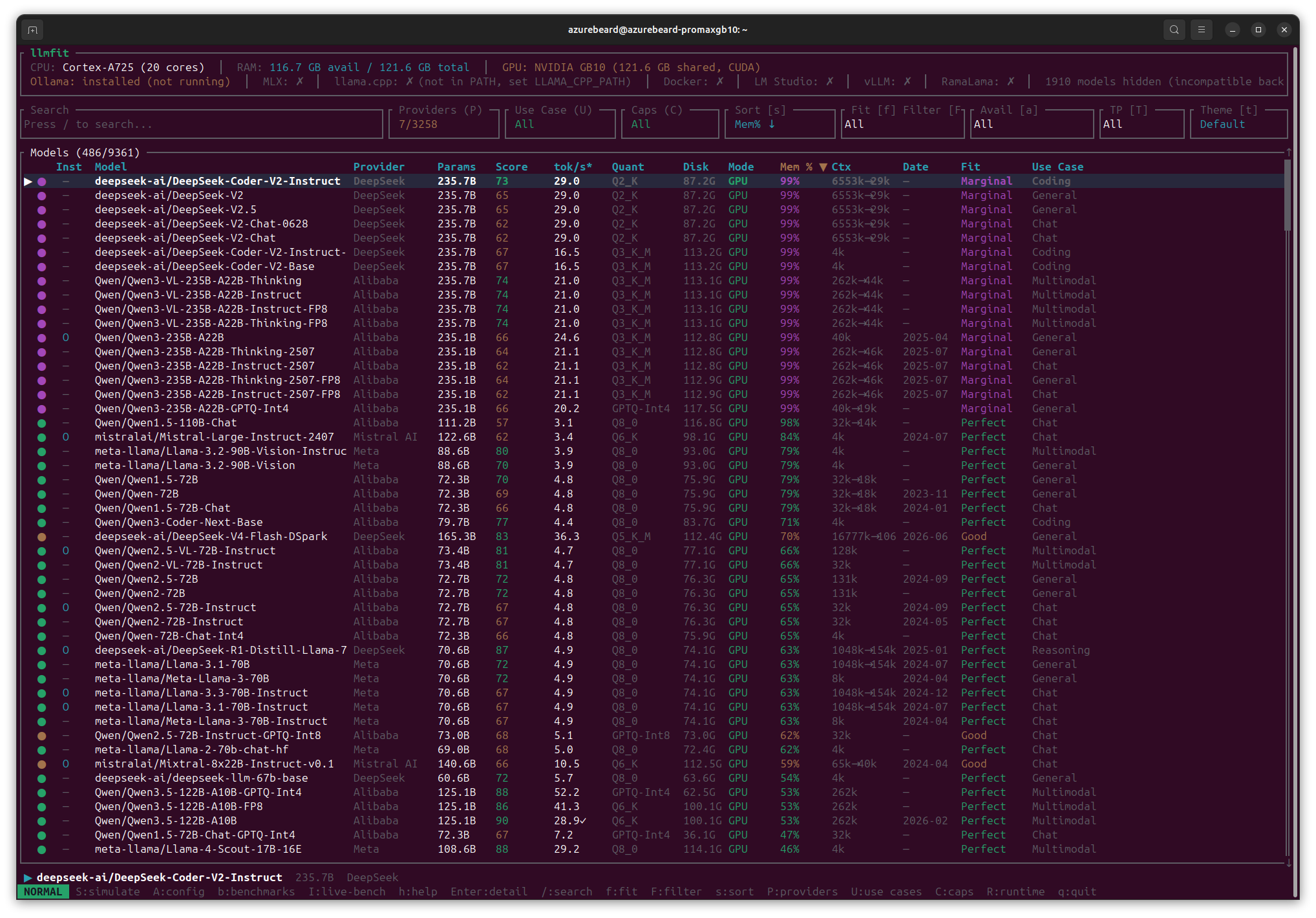
| Fit rating | Models | What it means |
|---|---|---|
| Perfect | 435 | Comfortable headroom |
| Good | 3 | Fits, some pressure |
| Marginal | 17 | 99% memory. Works until it doesn’t |
| Subtotal — will run | 455 | |
| Too Tight | 31 | Won’t run |
| Total assessed | 486 | |
| Hidden | 1,910 | Incompatible backend |
llmfit lets you filter by provider, and this run covers seven providers; DeepSeek, Alibaba/Qwen, Meta, Mistral, Google, Microsoft and one other out of 3,258 in its catalogue. So 455 is not “455 of everything”. The full-catalogue number would be larger and less useful, since most of those 3,258 are fine-tunes and forks of the same handful of base models.
Two things worth noticing.
435 Perfect, then 3 Good, then it falls apart. There is essentially no middle ground. You are not going to squeeze something in with careful tuning. It fits or it doesn’t.
The catalogue is moving fast, when I first ran this two weeks ago it knew about 7,675 models. Today it is 9,361. Any table in this post is a snapshot, and the method matters more than the numbers.
Don’t be lead by the parameter count
This is the one that surprised me, and it’s the reason the “what size model can I run” question is the wrong question.
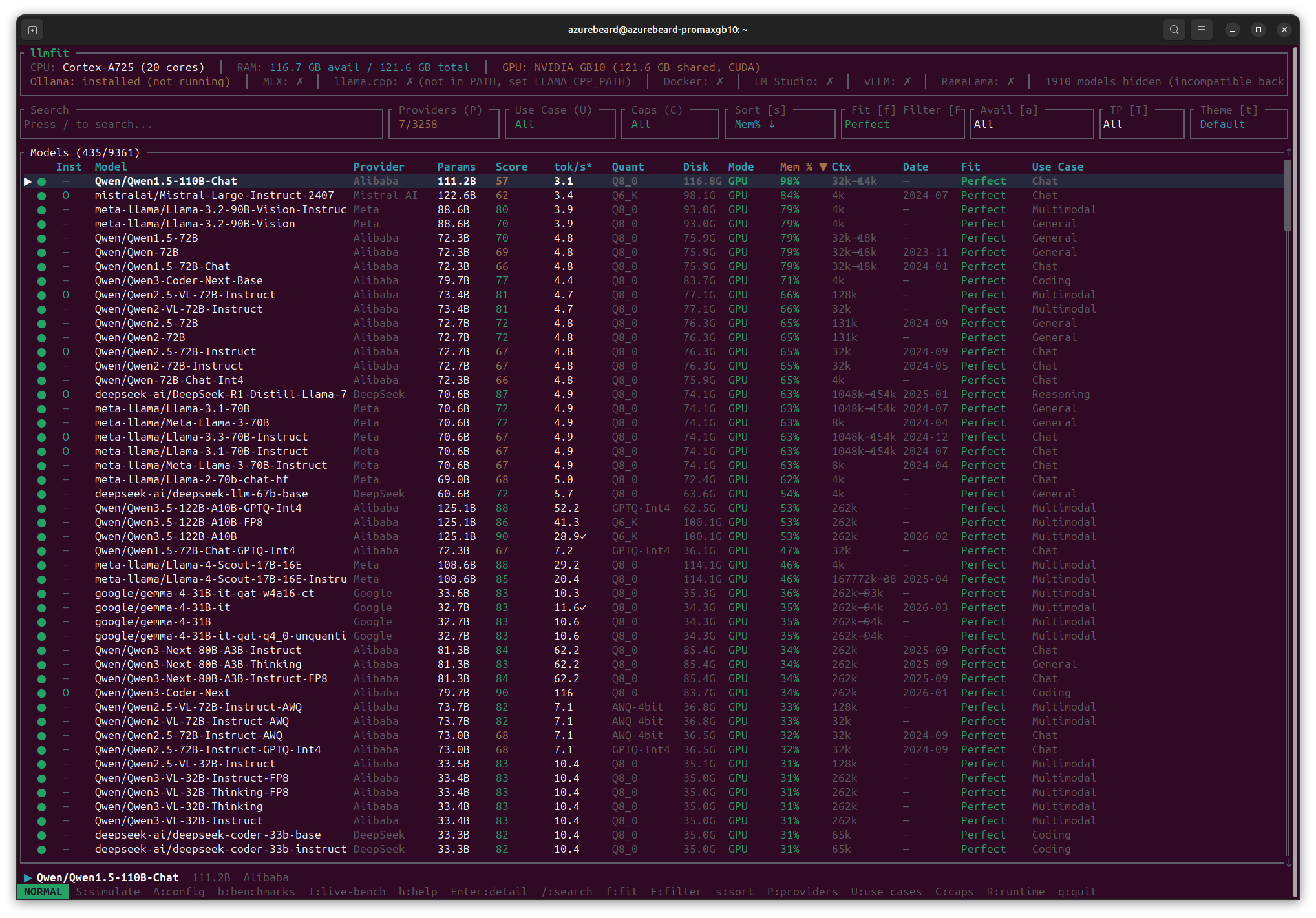
| Model | Params | Quant | Mem % | tok/s* | Score |
|---|---|---|---|---|---|
| Qwen3-Coder-Next | 79.7B | Q8_0 | 34% | 116 | 90 |
| Qwen3-Next-80B-A3B | 81.3B | Q8_0 | 34% | 62.2 | 84 |
| Qwen3.5-122B-A10B-GPTQ-Int4 | 125.1B | GPTQ-Int4 | 53% | 52.2 | 88 |
| Llama-4-Scout-17B-16E | 108.6B | Q8_0 | 46% | 29.2 | 88 |
| Qwen1.5-110B-Chat | 111.2B | Q8_0 | 98% | 3.1 | 57 |
| Mistral-Large-Instruct | 122.6B | Q6_K | 84% | 3.4 | 62 |
Look at the top and bottom rows. Qwen3-Coder-Next is 79.7B and estimated at 116 tok/s using 34% of memory, with the highest quality score in the whole fitting set. Qwen1.5-110B-Chat is 111.2B and estimated at 3.1 tok/s using 98%.
Roughly 37× the throughput, a third of the memory, and a substantially higher quality score — from the smaller-sounding model.
The difference is architecture. The fast ones are mixture-of-experts: nominally large, but only a fraction of the parameters activate for any given token. A10B and A3B in those model names are telling you the active parameter count, and that is the number that governs speed.
If you take one thing from this post: Stop asking “how many billion parameters can I run”. Ask what’s active, and what quantisation you’re using.
Quantisation buys more than you’d think
Same model, three formats:
| Model | Quant | Disk | Mem % | tok/s* | Score |
|---|---|---|---|---|---|
| Qwen3.5-122B-A10B | Q6_K | 100.1G | 53% | 28.9✓ | 90 |
| Qwen3.5-122B-A10B-FP8 | Q6_K | 100.1G | 53% | 41.3 | 86 |
| Qwen3.5-122B-A10B-GPTQ-Int4 | GPTQ-Int4 | 62.5G | 53% | 52.2 | 88 |
The Int4 version is 38GB smaller on disk and estimated at nearly twice the throughput of the base model, for two points of quality score.
That is not a coincidence. Generating a token requires reading the weights out of memory, so smaller weights mean fewer bytes read per token. Quantisation is a speed optimisation that happens to also save space.
Context, context, context…
llmfit shows advertised context against what actually fits in your remaining memory.
| Model | Advertised | Usable | Mem % |
|---|---|---|---|
| DeepSeek-V4-Flash-DSpark | 16,777k | ~106k | 70% |
| Llama-4-Scout-17B-16E-Instruct | 167,772k | ~88k | 46% |
| DeepSeek-R1-Distill-Llama-70B | 1,048k | ~154k | 63% |
| Qwen3-VL-235B-A22B | 262k | ~44k | 99% |
| Qwen1.5-110B-Chat | 32k | ~14k | 98% |
| Qwen3-Coder-Next | 262k | 262k (full) | 34% |
A model advertising a 16.7 million token context window gives you around 106k here. Context costs memory, and you only have what is left after the weights.
Note the bottom row. Qwen3-Coder-Next keeps its full 262k context, because it only used 34% of memory for weights. Models with headroom keep their context. Models that fill the box lose it.
That relationship is important.
Everything else
Marginal, 17 models, all at 99%. The 235B class: DeepSeek-V2 and Coder-V2, Qwen3-235B-A22B, Qwen3-VL-235B, at Q2_K or Q3_K_M. They technically fit. At 99% memory, with context already collapsed to a fraction of advertised, and nothing left for anything else on the machine.
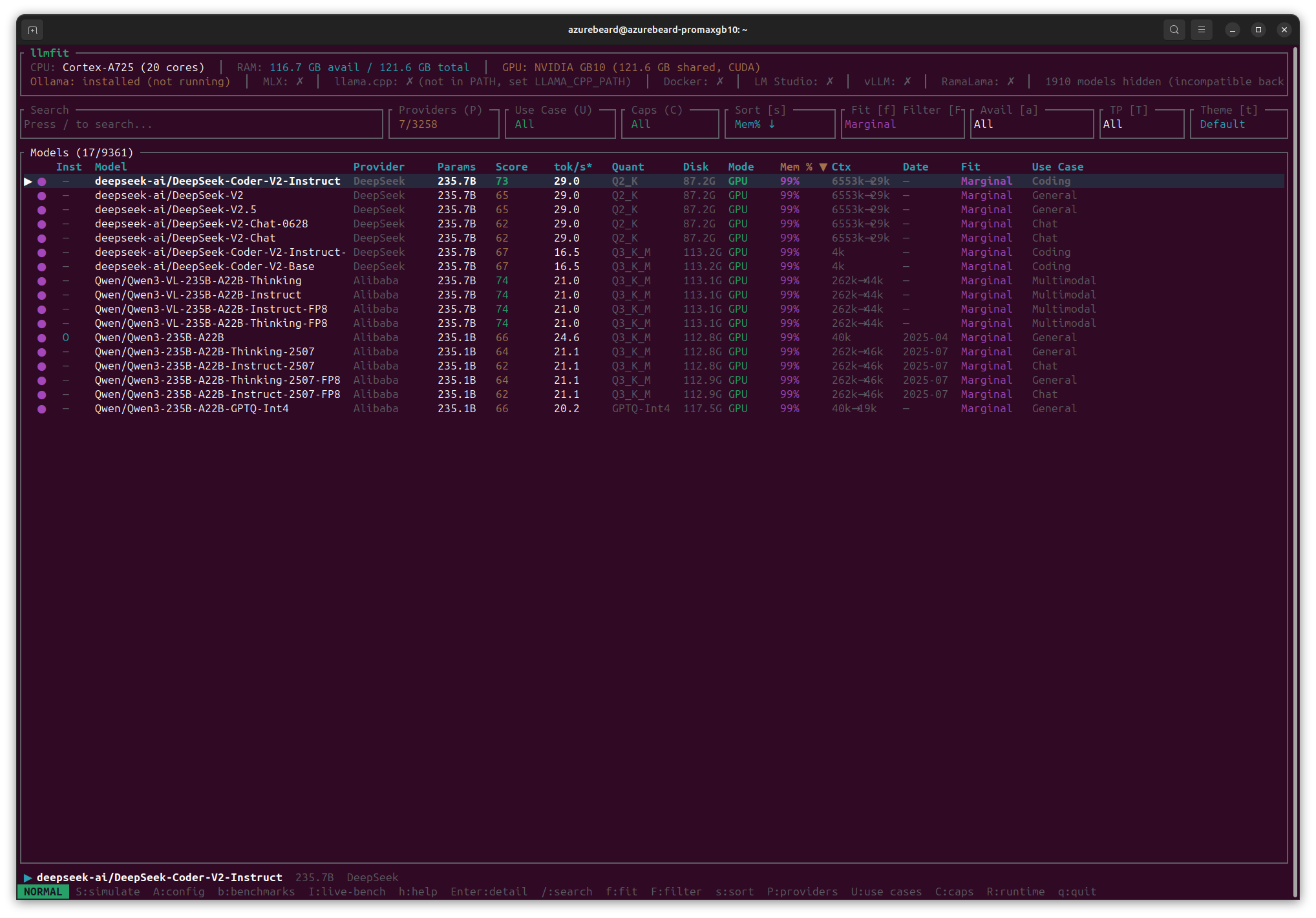
I would not plan production work here. This is the band where a second user, a long document, or a background process turns a working system into a failing one.
Too Tight, 31 models. From DeepSeek-R1 at 288% up to Qwen3.8-2.4T-A95B at 1,030% — a 2.4 trillion parameter model wanting 1.4TB of disk and ten times the memory this machine has.
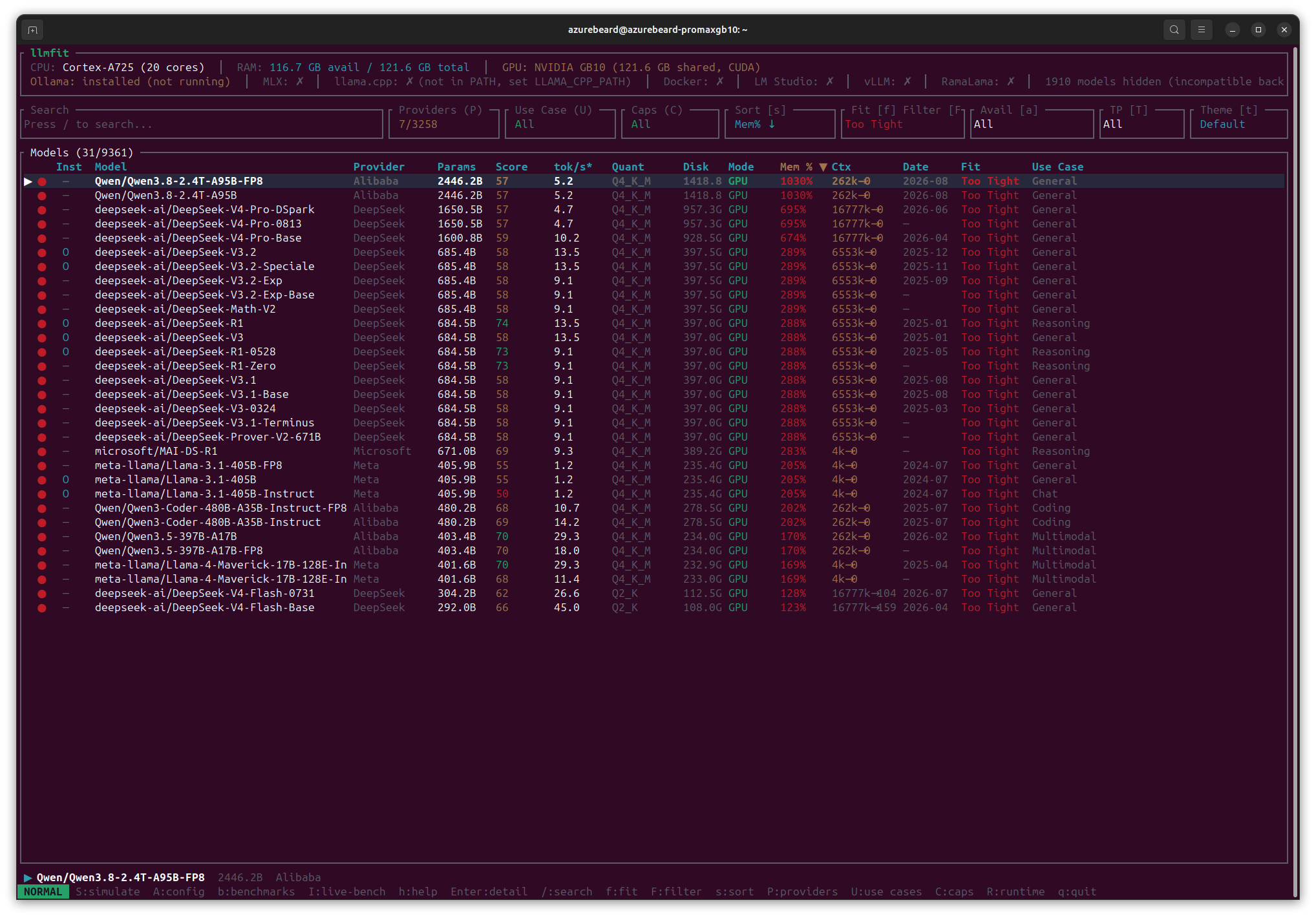
Worth stating plainly: the frontier models are not coming to your desk. Not this generation, not at this price. If your plan depends on running R1-class models locally, the plan needs different hardware or a different approach.
So what should you actually run?
Based on where the fit ratings and the throughput estimates land:
For interactive work — 32B class at Q8_0. Around 31% memory, full context retained, quality scores in the low 80s. Gemma-4-31B, Qwen3-VL-32B, Qwen3.5-32B-Instruct all sit here. Unglamorous and probably where you’ll live.
For quality with speed — the MoE 80–125B class. Qwen3-Coder-Next, Qwen3-Next-80B, Qwen3.5-122B-A10B. Best scores in the whole fitting set, 30–65 tok/s estimated, and enough headroom left for real context.
For maximum capability, accepting slowness — 70–122B dense at Q8_0. Around 60–98% memory, 1.7–2.8 tok/s. You send work to these rather than chatting with them.
Not at all — anything above ~235B. The cliff is real and it is steep.
Method, and an honest caveat
These are llmfit’s calculated figures, not my benchmarks. The tool computes fit from model metadata against reported hardware, and estimates throughput. It does not run the models. That asterisk on the tok/s* column is doing real work.
I’m publishing them because the fit maths is sound and the relative picture. MoE beats dense, quantisation beats size, context eats memory and it holds regardless of whether any individual number is exact.
But I said in week one that every number would come with a method you could reproduce, so I’m taking one model from each band, running it properly, and reporting where llmfit was right and where it wasn’t. That goes in the repo alongside this table.
- Run date: 26 August 2026
- Hardware as reported: 121.6GB total, 116.7GB available, Cortex-A725 ×20, NVIDIA GB10, CUDA
- Catalogue: 9,361 models; 1,910 hidden as backend-incompatible
- Providers: 7 of 3,258 selected
- Runtime state: Ollama installed but not running. No llama.cpp, vLLM, Docker, LM Studio or MLX
- Tool: llmfit
Raw output, screenshots and verification runs soon to be here: Local AI Repo
Disclosure: hardware gifted by Dell. No payment, no editorial control, no pre-publication review.
Posts in this series
- Dell ProMax, What Fits in 128GB?
- Myth Busting the GB10
- I Was Given the Hardware. Here Are My Guardrails